
How Shared Hosting Impacts Application Performance Under Load
Shared hosting often appears adequate during early development or low-traffic periods. Problems emerge when application usage increases and system load rises beyond baseline levels. Under load, shared hosting does not fail gracefully; instead, performance degradation appears suddenly and unpredictably.

Understanding how and why this happens is critical before performance issues are mis-attributed to code quality or framework choice.
- What “Under Load” Means for Web Applications
- CPU and Memory Contention in Shared Hosting
- Disk I/O and Database Bottlenecks During Traffic Spikes
- The Noisy Neighbor Effect Explained at Application Level
- Common Performance Symptoms Applications Exhibit
- When Shared Hosting Stops Being Viable
- Trade-Offs and Hard Limits You Cannot Optimize Around
- Decision Takeaway: Interpreting Performance Signals
What “Under Load” Means for Web Applications
“Under load” refers to conditions where an application must handle concurrent requests that stress CPU, memory, disk I/O, or database throughput. This can be triggered by traffic spikes, background jobs, scheduled tasks, API bursts, or simultaneous user actions.
In shared hosting, load is not isolated to a single application. Multiple tenants compete for the same physical resources, which means your application’s performance is affected not only by its own usage patterns but also by the behavior of other sites on the same server.
CPU and Memory Contention in Shared Hosting
Shared hosting environments enforce strict CPU time and memory ceilings per account. These limits are rarely transparent and are often enforced through throttling rather than hard failures.
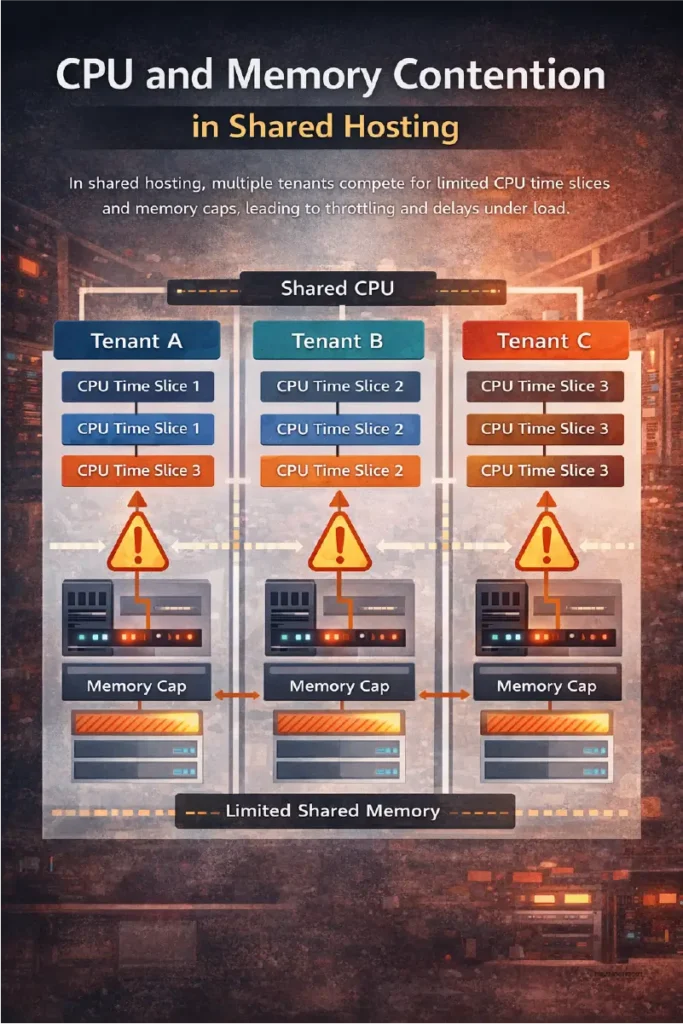
Under moderate load, CPU contention increases request processing time. PHP, Python, or Node processes wait longer for execution slices, which directly increases response latency. When memory limits are approached, processes may be killed or swapped, leading to partial page loads or intermittent errors.
These constraints cannot be mitigated at the application layer once concurrency increases beyond a narrow threshold.
Disk I/O and Database Bottlenecks During Traffic Spikes
Disk I/O is one of the most common failure points under shared hosting load. Applications that rely on database queries, session storage, logging, or file-based caching amplify I/O pressure during peak traffic.
Because disk subsystems are shared, a spike in write activity from another tenant can stall database reads for your application. This manifests as slow queries, delayed transactions, or request timeouts even when CPU usage appears normal.
The application experiences symptoms, but the root cause exists outside its control.
The Noisy Neighbor Effect Explained at Application Level
The noisy neighbor effect occurs when one or more tenants consume disproportionate resources, degrading performance for others. At the application level, this appears as inconsistent latency, unpredictable slowdowns, or sudden throughput drops.
These effects are intermittent, which makes diagnosis difficult. Performance issues may disappear during debugging or low-traffic windows, only to reappear under real-world usage. This inconsistency is a defining characteristic of shared hosting under load.
Common Performance Symptoms Applications Exhibit
When shared hosting reaches its practical limits, applications typically show consistent patterns:
- Increased response times during peak hours
- Intermittent 500 or timeout errors
- Database connection failures under concurrency
- Background jobs running late or failing silently
- Caching layers becoming ineffective under load
These symptoms are structural, not code-level defects.
When Shared Hosting Stops Being Viable
Shared hosting becomes non-viable when application performance depends on predictable latency, concurrent users, or background processing. Applications with real-time features, authenticated dashboards, APIs, or transactional workflows are especially sensitive.
Once load crosses a certain threshold, optimization efforts yield diminishing returns because the limiting factor is resource isolation, not efficiency.
Trade-Offs and Hard Limits You Cannot Optimize Around
There are limits that tuning cannot overcome:
- CPU throttling cannot be bypassed
- Memory caps are enforced at the system level
- Disk I/O contention is external to the application
- No control over kernel, queuing, or process priority
At this point, further optimization only masks symptoms temporarily.
Decision Takeaway: Interpreting Performance Signals
If application performance degrades only under load and recovers without code changes, the hosting environment is the constraint. Shared hosting is suitable for low-concurrency workloads but structurally incompatible with scale-able applications.
The correct response is not aggressive optimization, but acknowledging when the infrastructure no longer matches the application’s performance requirements.